Interview questions - Experienced Apigee developer

Q: Difference Between Apigee X (Google Cloud SaaS Deployment) and Apigee Hybrid
Answer:
When preparing for an Apigee Developer technical interview, one of the most commonly asked questions is the difference between Apigee X and Apigee Hybrid. Understanding this comparison not only helps in interviews but also demonstrates your architectural decision-making skills in real-world API platform design.
Below is a clear breakdown along with a visual understanding.
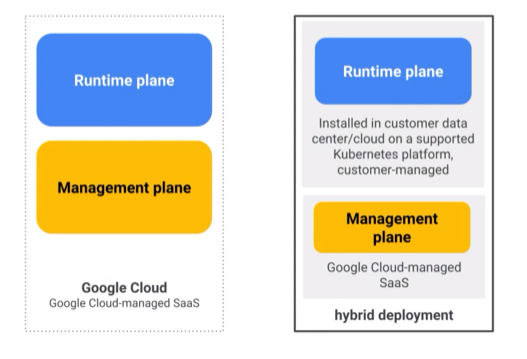
Apigee X – Google Cloud SaaS Deployment
Apigee X is a fully managed SaaS offering on Google Cloud. This means:
Google manages both the runtime plane and the management plane.
Developers can start immediately with designing, deploying, securing, and scaling APIs.
No infrastructure setup or operational overhead.
Google automatically handles:
Scaling
Patching
Upgrades
reliability and availability
When to choose Apigee X?
When your team wants the fastest time to market without managing Kubernetes clusters or runtime infrastructure.
Apigee Hybrid Deployment
Apigee Hybrid gives customers the flexibility to install and operate the runtime plane on their own infrastructure, while Google continues to manage the management plane.
In Hybrid:
Runtime plane → Customer-managed, deployed on:
On-prem data centers
Private cloud
Any supported Kubernetes platform
Management plane → Google-managed SaaS, just like Apigee X.
This provides more control, compliance, data residency, and security for enterprises with strict governance requirements.
Key Difference: Operational Responsibility
| Feature | Apigee X (SaaS) | Apigee Hybrid |
| Runtime Plane | Google-managed | Customer-managed |
| Management Plane | Google-managed | Google-managed |
| Infrastructure Responsibility | Customer | |
| Setup Time | Very fast | Requires Kubernetes + DevOps |
| Ideal For | Cloud-first teams | Regulated industries, on-prem workloads |
Q: What are the key differences between Apigee X, Apigee Hybrid, Apigee Edge Private Cloud, and Apigee Edge Cloud?
Q: Google Cloud Armor – Network-Level Protection
Answer:
Google Cloud Armor acts as a Web Application Firewall (WAF) designed to protect APIs from:
Distributed Denial-of-Service (DDoS) attacks
Malicious IP traffic
Layer 7 attempts to overload or exploit the API
It uses Google's global edge infrastructure to filter harmful traffic before it reaches your Apigee runtime.
Key Benefits
DDoS mitigation
IP allow/deny lists
OWASP rules
Geo-based access controls
Cloud Armor works particularly well when your APIs are exposed publicly through Apigee X.
Q: reCAPTCHA Enterprise – Bot Detection and Prevention
Answer:
reCAPTCHA Enterprise protects your APIs and apps from automated attacks, credential stuffing, bot behavior, and scraping.
It uses continuous machine learning to differentiate between:
Legitimate users
Malicious bots
Automated scripts
You can integrate reCAPTCHA score checks into Apigee flows to block suspicious calls.
Q: Spike Arrest Policy – Protecting Against Traffic Spikes
Answer:
The Spike Arrest policy shields your backend systems from sudden traffic bursts.
How it works
It smooths traffic by enforcing a fixed rate limit, such as:
10 requests per second50 requests per minute
You can apply spike arrest at different levels:
API-level
App-level
Developer-level
User-level
IP address
Custom variables
This prevents backend outages caused by unexpected spikes or malicious flooding.
Q: Regular Expression Protection Policy – Payload-Level Security
Answer:
Apigee’s Regular Expression Protection policy allows you to detect and block malicious content inside:
Request payloads
Headers
Query parameters
Form data
Any flow variable
This is used to block attacks such as:
SQL injection
Cross-site scripting (XSS)
Script injection
Dangerous patterns or keywords
When a match occurs, Apigee immediately rejects the request before it hits your backend—preventing compromise.
Q: Authentication vs. Authorization – Know the Difference
Answer:
Understanding this distinction is crucial in interviews and in API security architecture.
Authentication
Verifies who the caller is
Validates credentials
Ensures the identity is trusted
Examples:
OAuth tokens
API keys
JWT-based identity
Authorization
Determines what the authenticated entity is allowed to do
Happens after successful authentication
Examples:
Role-based access
Scopes
Attribute-based access control
Q: OAuth 2.0 and SAML 2.0 in Apigee
Apigee supports modern identity and access management using:
OAuth 2.0
Used for API authorization.
Apigee can generate, validate, and introspect OAuth tokens.
Use cases:
Mobile apps
Web applications
API-to-API communication
SAML 2.0
Used primarily for enterprise Single Sign-On (SSO).
Use cases:
Login via corporate identity providers
Federated identity and access management
Q: What Is a Refresh Token?
In OAuth 2.0, a refresh token allows a client to obtain a new access token without re-authenticating the user.
Why it’s used
Access tokens expire quickly for security
Refresh tokens maintain long-term access without user intervention
Improves security by not exposing credentials repeatedly
This is a common interview topic for API security design.
Q: What is the Password Grant Type in OAuth 2.0 and how does Apigee handle token creation for it?
Answer:
The Password Grant Type (also known as Resource Owner Password Credentials Grant) is used when a highly trusted application directly collects the user’s username and password and exchanges them for an access token. This grant type should only be used by confidential, trusted applications such as internal enterprise apps.
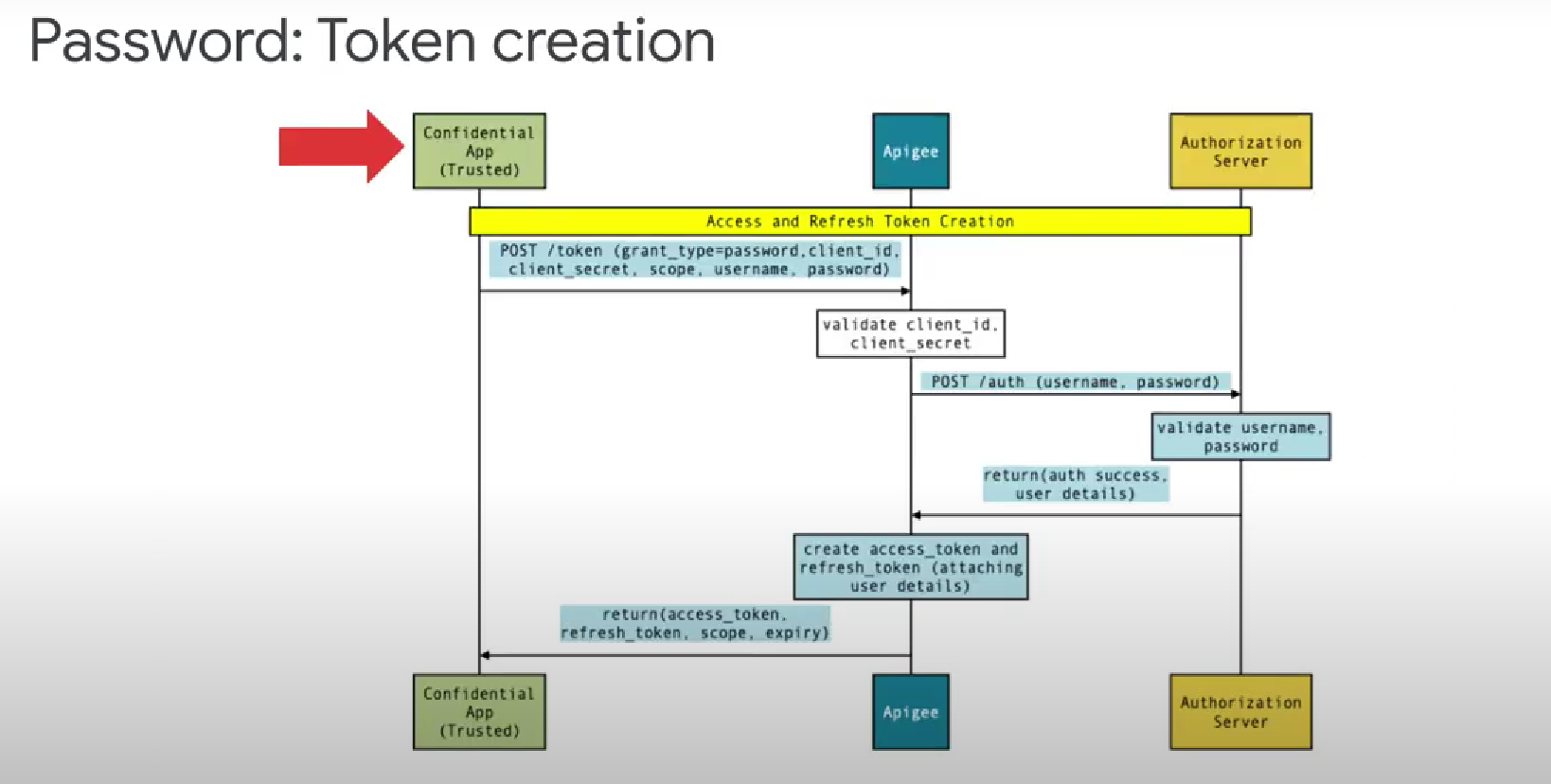
How token creation works in Apigee (Flow Explanation):
Confidential App (Trusted Client) sends a request to Apigee’s token endpoint:
 POST /token
 grant_type=password
 client_id
 client_secret
 username
 password
 scope
Apigee validates:
client_idclient_secret
Apigee then makes a call to the Authorization Server to validate the user credentials.
Authorization Server verifies:
usernamepassword
Once the credentials are valid, the Authorization Server returns:
authentication success
user details
Apigee generates:
access token
refresh token
attaches user details
assigns scopes and expiry
Apigee returns the final response back to the client:
access token
refresh token
scope
expiry
Key Points:
This flow should be used only for trusted apps, never for public/mobile/web apps.
It exposes user credentials to the client application, hence has security risks.
Many organizations avoid this grant unless required for legacy systems.
Q: What is the Authorization Code Grant Type and how does Apigee initiate the authorization flow?
Answer:
The Authorization Code Grant Type is the most commonly used OAuth 2.0 flow and is designed for confidential or untrusted applications (such as web apps). This flow ensures that user credentials are never exposed to the application directly. Instead, the app receives an authorization code, which it later exchanges for an access token.
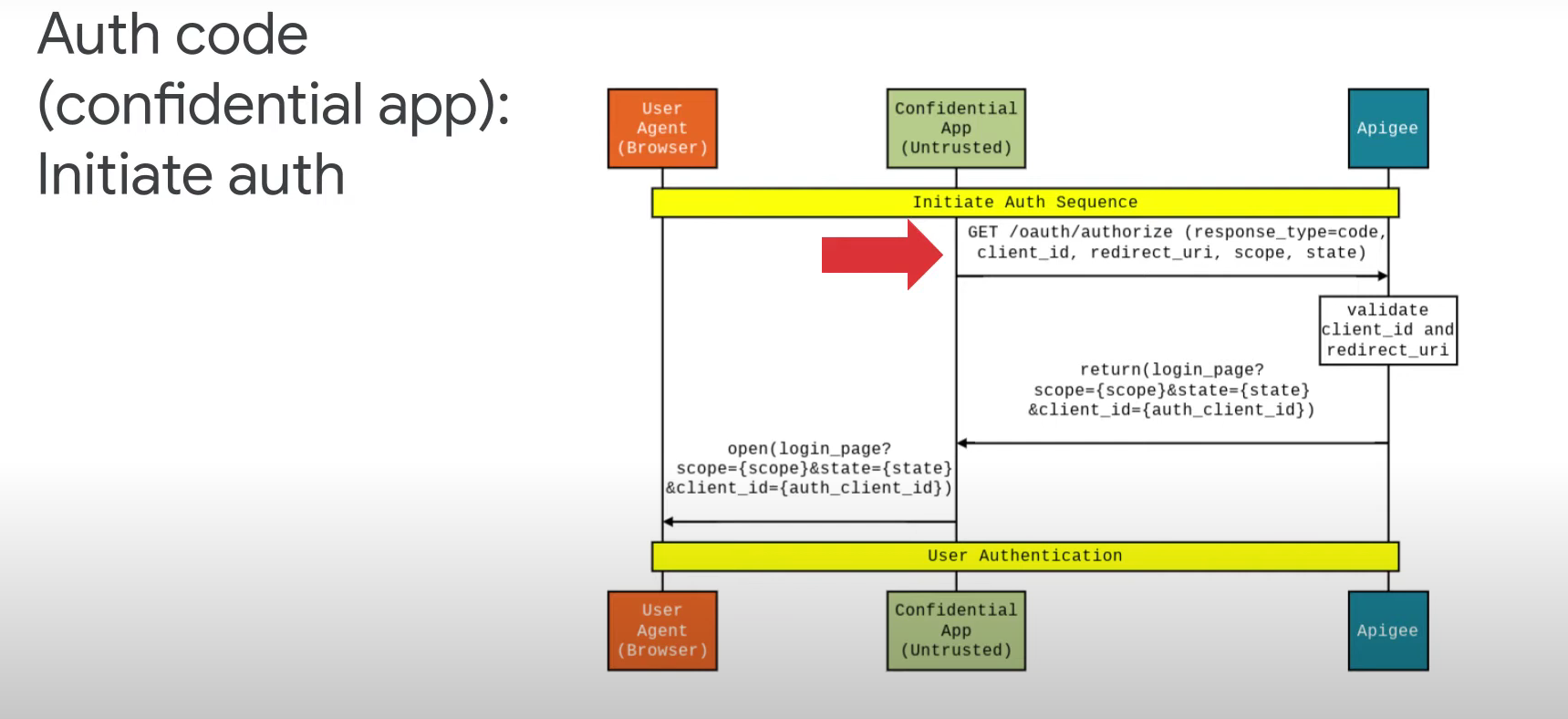
How Apigee handles the initiation of this flow:
The User Agent (Browser) triggers authentication by redirecting the user to Apigee’s authorization endpoint:
 GET /oauth/authorize
     ?response_type=code
     &client_id={client_id}
     &redirect_uri={callback_url}
     &scope={scope}
     &state={state}
Apigee validates:
the
client_idthe
redirect_uri
If valid, Apigee returns the login page to the user’s browser, including:
scope
state
client_id
The user then authenticates themselves by submitting credentials to the login page.
After successful authentication, Apigee proceeds to generate an authorization code, which will later be exchanged for an access token in the next stage of the flow.
Why Authorization Code Grant is preferred:
Ensures user credentials are not shared with the client app.
Provides strong security through redirects and authorization codes.
Suitable for web apps, backend apps, and confidential clients.
Q: What is the Authorization Code Grant Type in OAuth 2.0?
Answer:
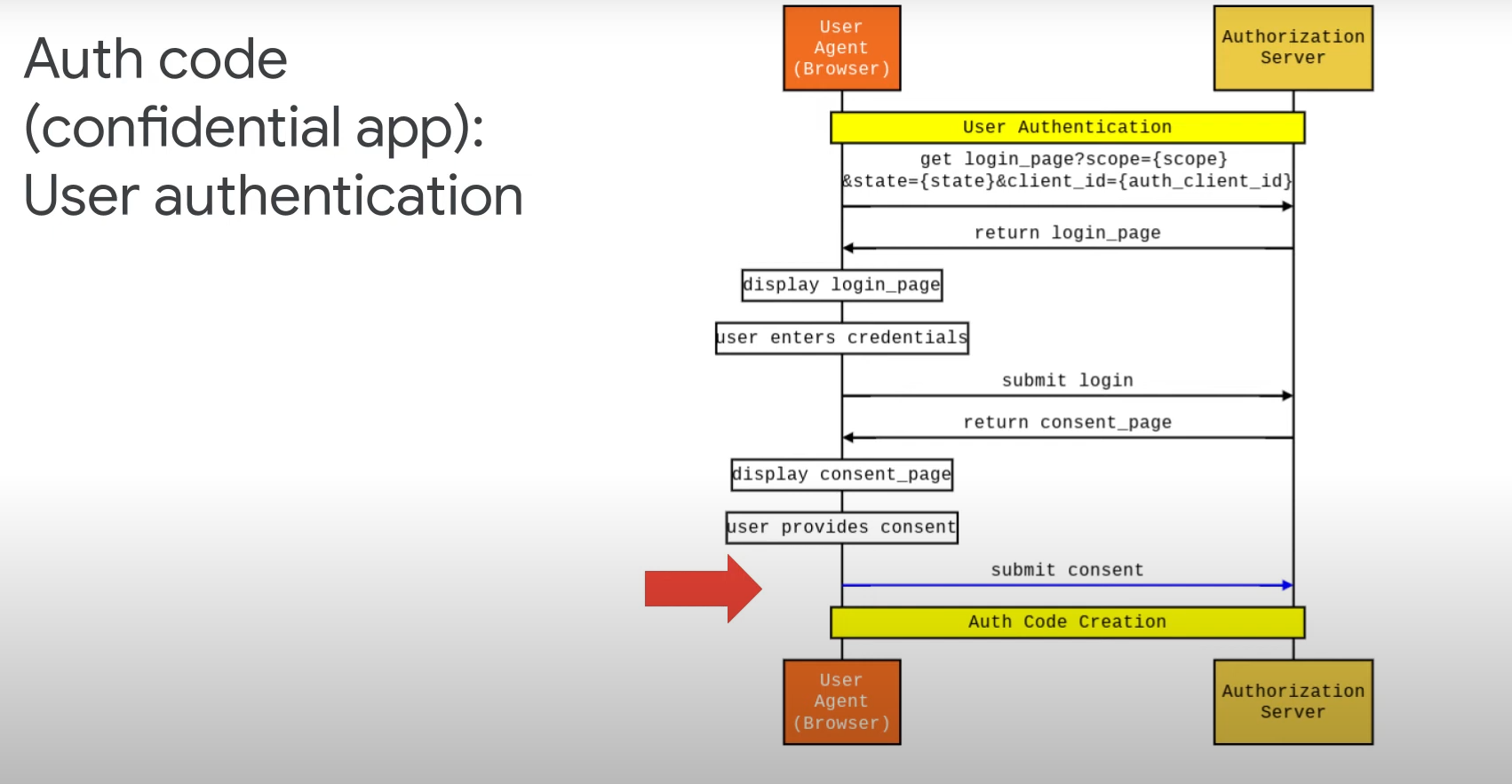
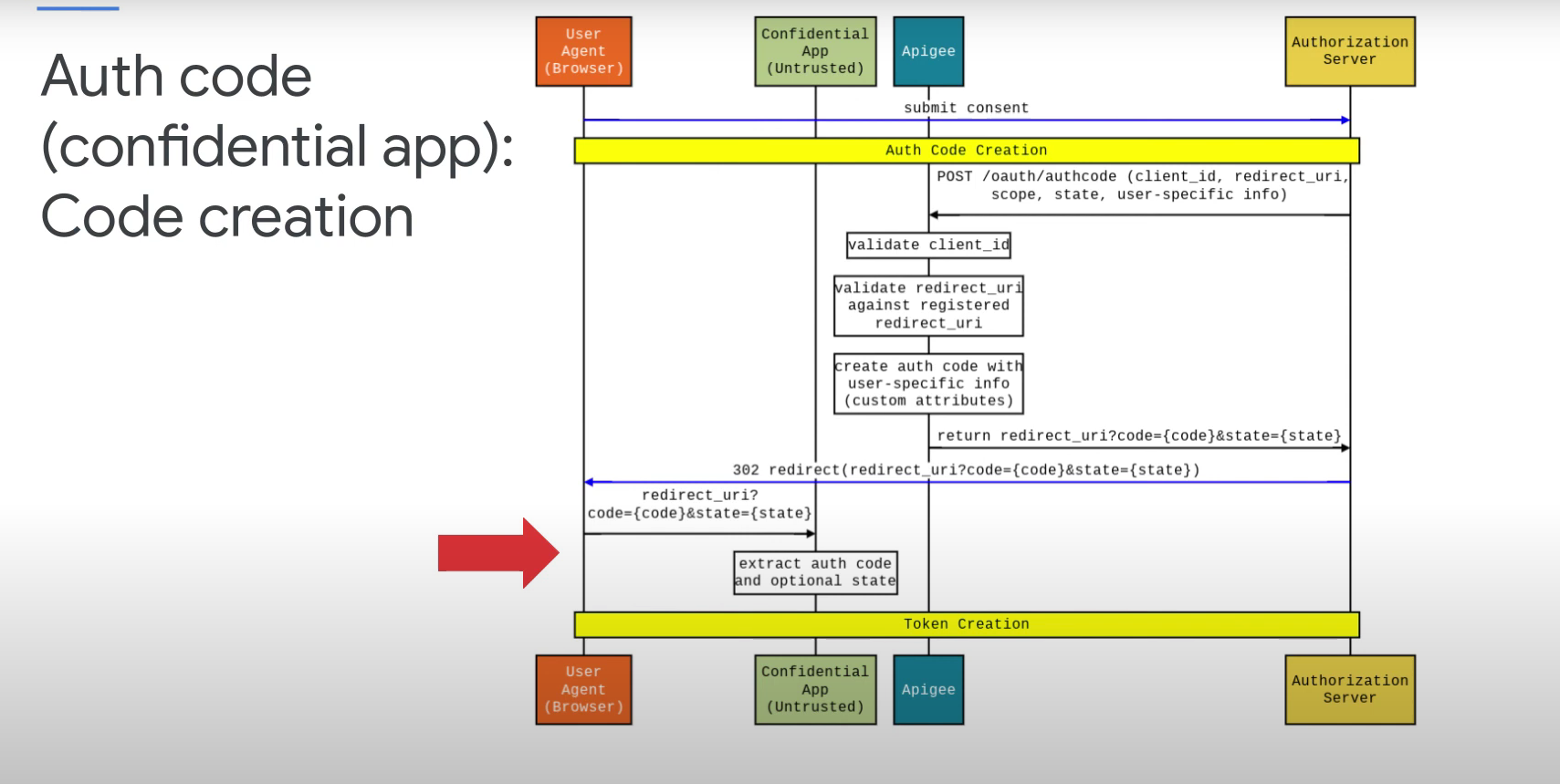
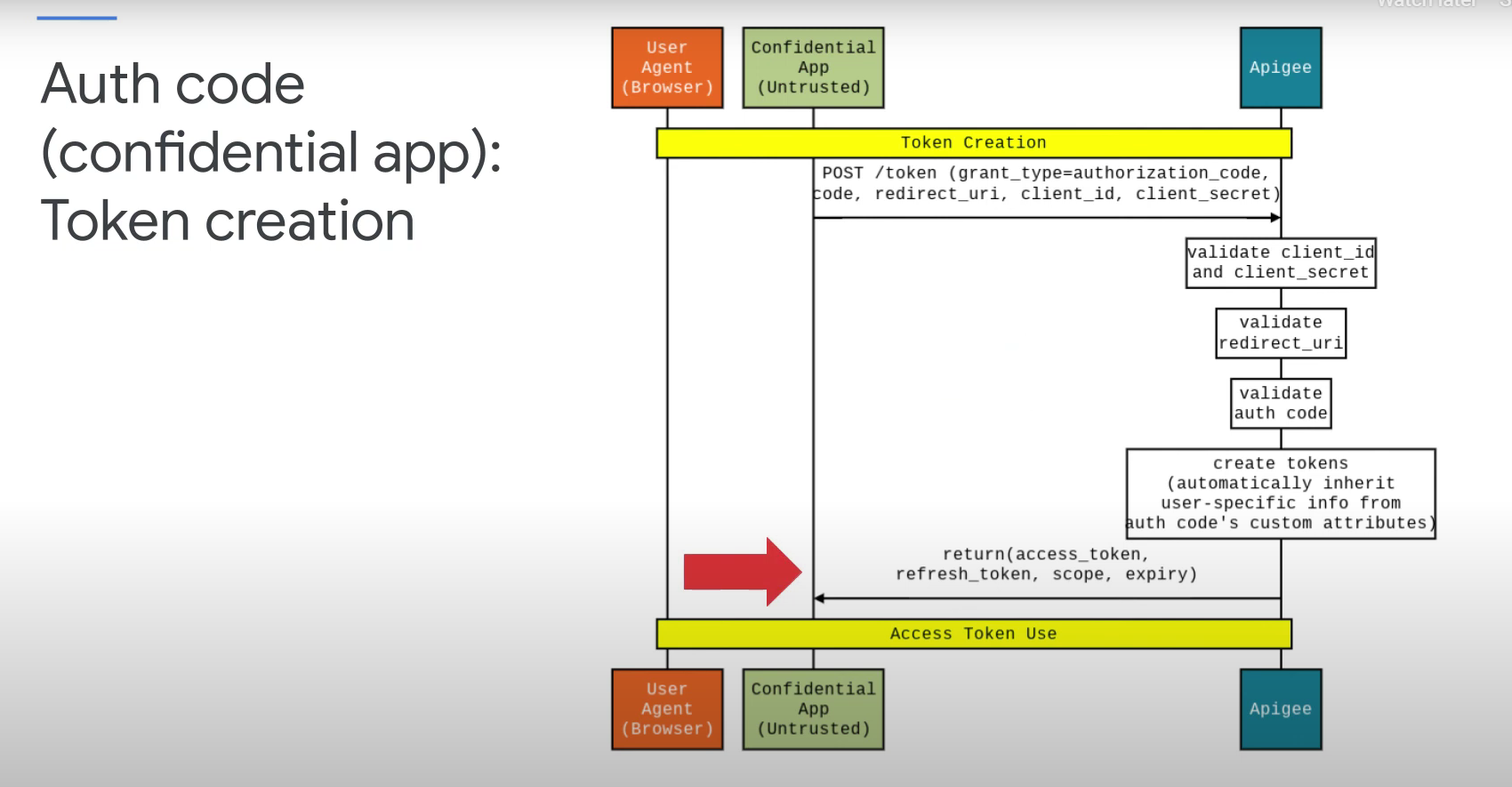
It is one of the most secure OAuth 2.0 flows used by confidential client applications (like server-side apps).
The flow involves redirecting the user to an authorization server where they authenticate and authorize the app.
After successful authentication, the authorization server sends an authorization code to the app via the redirect URI.
The app then exchanges this code for an access token by making a secure POST request to the token endpoint.
This ensures that user credentials are never exposed to the client app, making it suitable for apps that can securely store secrets.
Commonly used with OpenID Connect for identity verification as well.
Q: What is TLS (Transport Layer Security) and how does it work?
Answer:
TLS is a protocol that establishes a secure, encrypted communication channel between a client and a server over HTTP (i.e., HTTPS).
It uses digital certificates and public/private key cryptography to ensure confidentiality, integrity, and authenticity of data.
🔐 One-Way TLS Flow (Server Authentication Only)
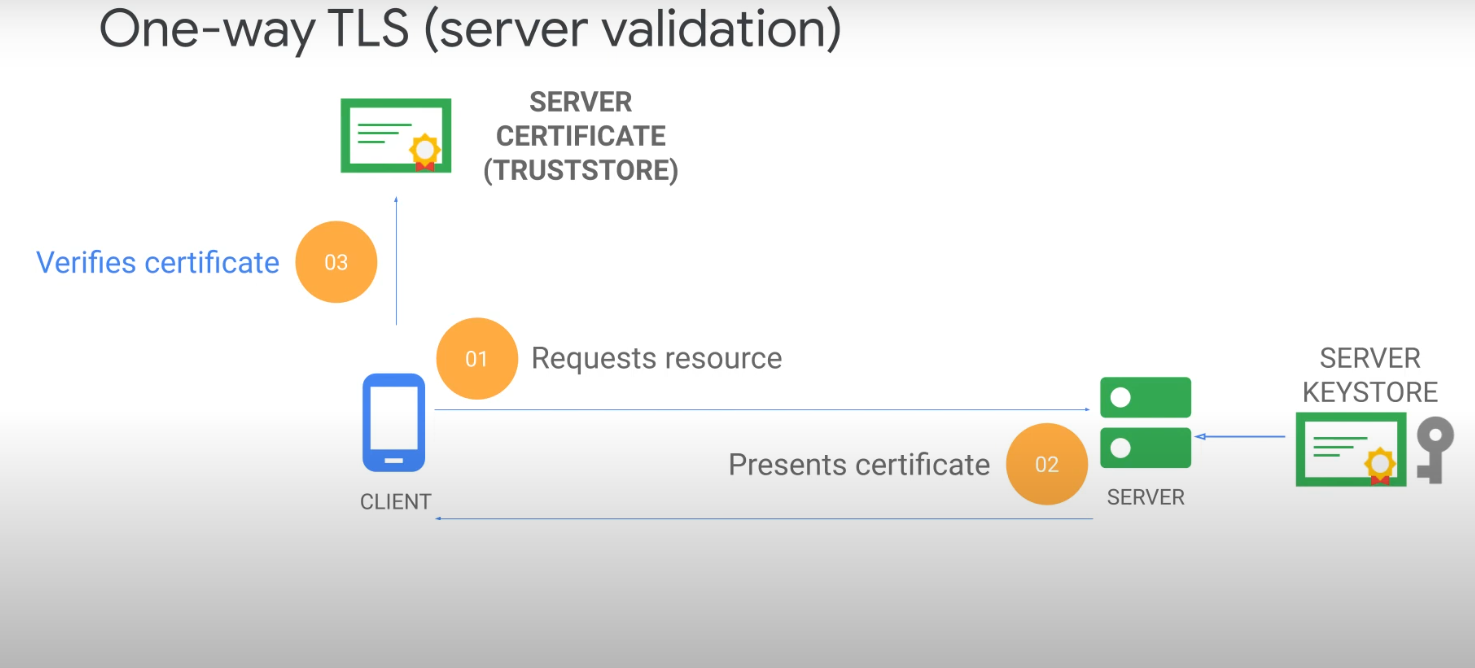
In one-way TLS, only the server is authenticated. Here's how the flow works:
Client requests a resource from the server.
Server presents its certificate to the client.
Client verifies the server's certificate using its truststore (which contains trusted CA certificates).
If the certificate is valid, a secure TLS session is established.
✅ This is the most common TLS setup used in HTTPS websites and APIs.
🔐 Two-Way TLS Flow (Mutual Authentication)
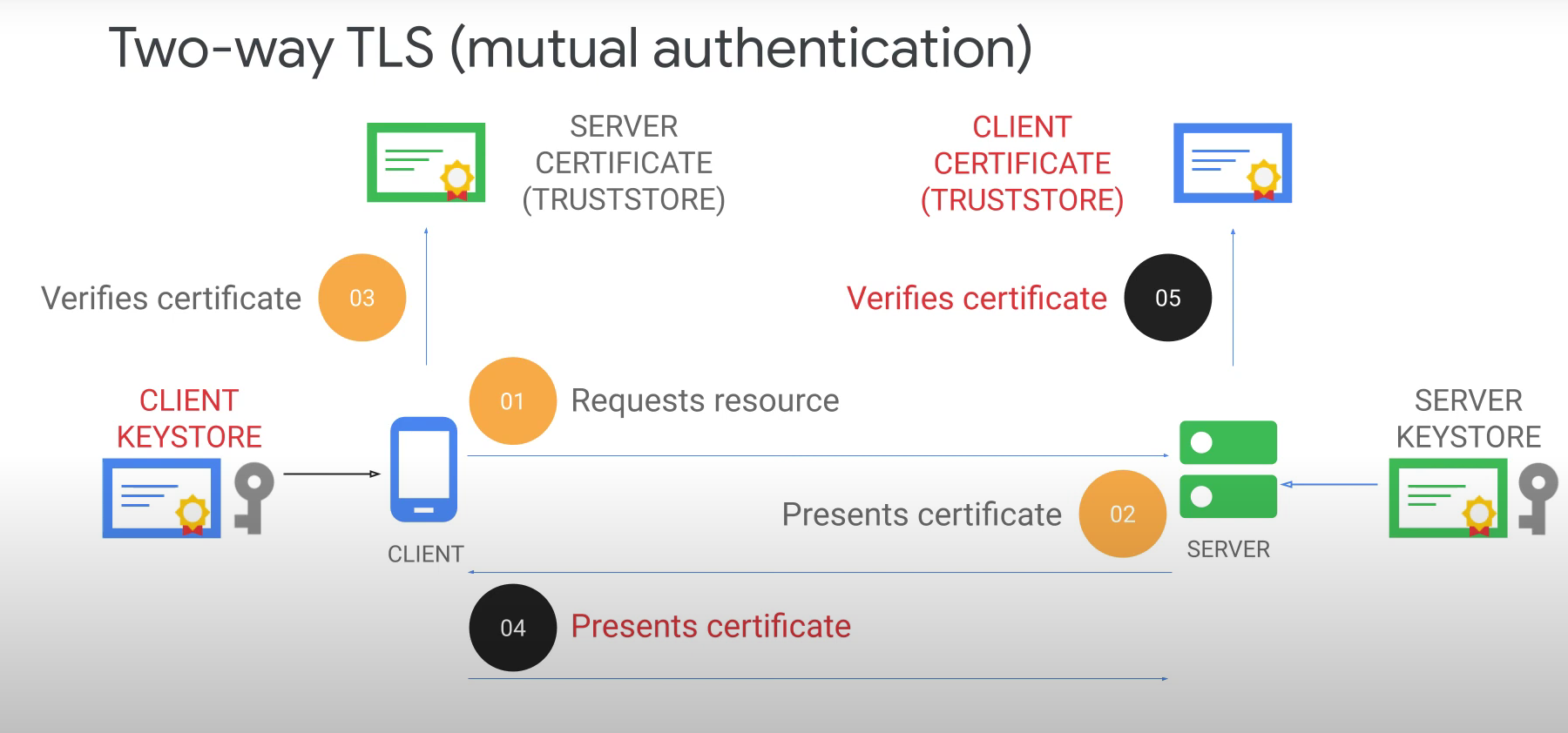
In two-way TLS, both client and server authenticate each other. Here's the flow:
Client requests a resource from the server.
Server presents its certificate to the client.
Client verifies the server's certificate using its truststore.
Client presents its own certificate to the server.
Server verifies the client's certificate using its truststore.
If both certificates are valid, a mutually authenticated TLS session is established.
This setup is used in high-security environments, such as B2B APIs, financial systems, and internal microservices.
Q: What is Federated Identity and how does Single Sign-On (SSO) work?
Answer:
Federated Identity allows users to access multiple applications and services using a single set of credentials.
It enables Single Sign-On (SSO) across different systems, often spanning multiple organizations or domains.
Users authenticate once with a trusted identity provider (IdP), and then gain access to all connected services without re-authenticating.
Common protocols used include SAML, OAuth 2.0, and OpenID Connect.
This approach improves user experience, reduces password fatigue, and enhances security by centralizing authentication.
Q: What is SAML (Security Assertion Markup Language) and how does it work?
Answer:
SAML is a SOAP and XML-based protocol used for exchanging authentication and authorization data between Identity Providers (IdPs) and Service Providers (SPs).
It uses XML-formatted tokens called security assertions to securely transmit user identity and access rights.
In a typical SAML flow:
The user tries to access a service provider (e.g., an enterprise app).
The SP redirects the user to the IdP (e.g., Google).
The IdP authenticates the user and sends a SAML assertion back to the SP.
The SP grants access based on the assertion.
Example:
IdP: Google (stores actual credentials securely).
Service Provider: An app like Google Mail that uses Google for login.
The service provider only receives basic user info (e.g., email, name) from the IdP — it does not store or manage credentials.
SAML is widely used in enterprise SSO (Single Sign-On) setups for secure, federated identity management.
Q: What is OpenID Connect (OIDC) and how does it differ from SAML?
Answer:
OpenID Connect (OIDC) is a RESTful and JSON-based identity protocol built on top of OAuth 2.0.
It is considered a lightweight redesign of SAML, offering simpler integration for modern web and mobile apps.
OIDC issues an ID token (in JWT format) that contains user identity information.
This token can be used to verify the identity of the bearer and retrieve user details without contacting the Identity Provider (IdP) again.
OIDC is widely adopted in cloud-native applications, mobile apps, and API-based architectures due to its simplicity and scalability.
While SAML uses XML and is suited for enterprise SSO, OIDC is preferred for modern, distributed systems.
Q: What are Flow Hooks in Apigee?
Answer:
Flow Hooks allow you to attach reusable policies at specific points in the API proxy flow.
They help enforce common logic across multiple proxies without duplicating configuration.
Types of Flow Hooks:
Pre-Proxy Flow Hook → Executes before the proxy endpoint request flow begins.
Post-Proxy Flow Hook → Executes after the proxy endpoint response flow completes.
Typical use cases: logging, security checks, transformations, or analytics policies applied globally.
Q: What is an Access Control Policy in Apigee?
Answer:
The Access Control policy restricts or allows traffic based on IP addresses or CIDR ranges.
It ensures that only trusted clients or networks can access your APIs.
Common use cases:
Allowing only internal IP ranges to call sensitive APIs.
Blocking malicious or untrusted IPs.
This policy is often applied at the proxy endpoint or via flow hooks for consistent enforcement.
Q: What is Response Cache in Apigee?
Answer:
The Response Cache policy stores API responses temporarily to improve performance and reduce backend load.
When a request matches the cache key, Apigee serves the cached response instead of forwarding the request to the backend.
Benefits:
Reduced latency for clients.
Lower backend traffic and cost savings.
Improved scalability during high request volumes.
Cache can be configured with expiry times, cache keys, and scope (per proxy or shared across proxies).
Q: What is PKCE (Proof Key for Code Exchange) and how does it enhance OAuth 2.0 security?
Answer:
PKCE is an extension to the OAuth 2.0 Authorization Code flow designed for public clients (e.g., mobile or single-page apps) that cannot securely store client secrets.
It prevents authorization code interception attacks by requiring a dynamically generated secret — the code verifier — during token exchange
PKCE Flow Breakdown
1. PKCE Code Generation
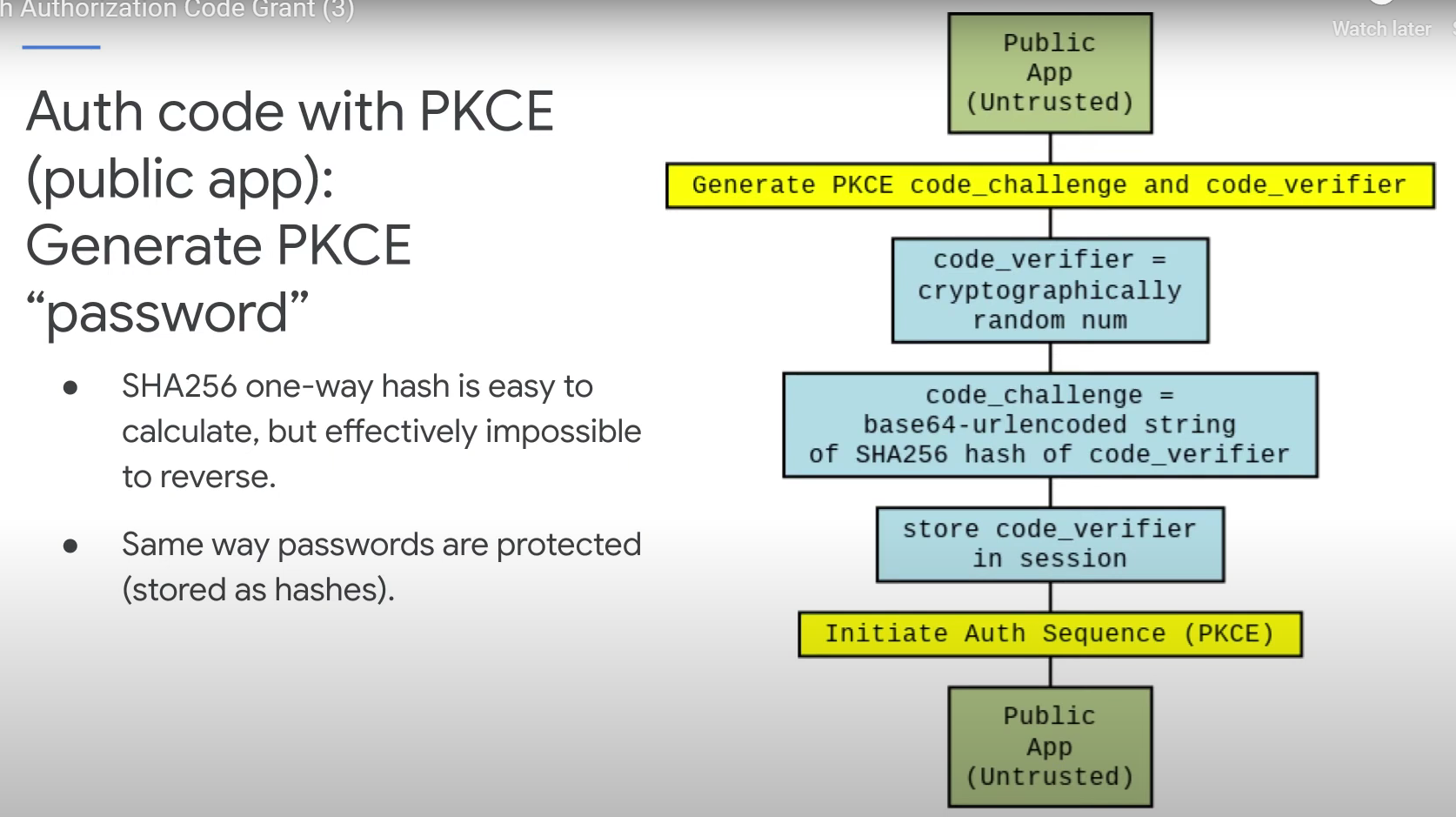
The public client generates a random string called
code_verifier.It then creates a
code_challengeby applying a SHA256 hash to thecode_verifierand encoding it.The
code_verifieris stored in the client session for later use.
2. Initiate Authorization
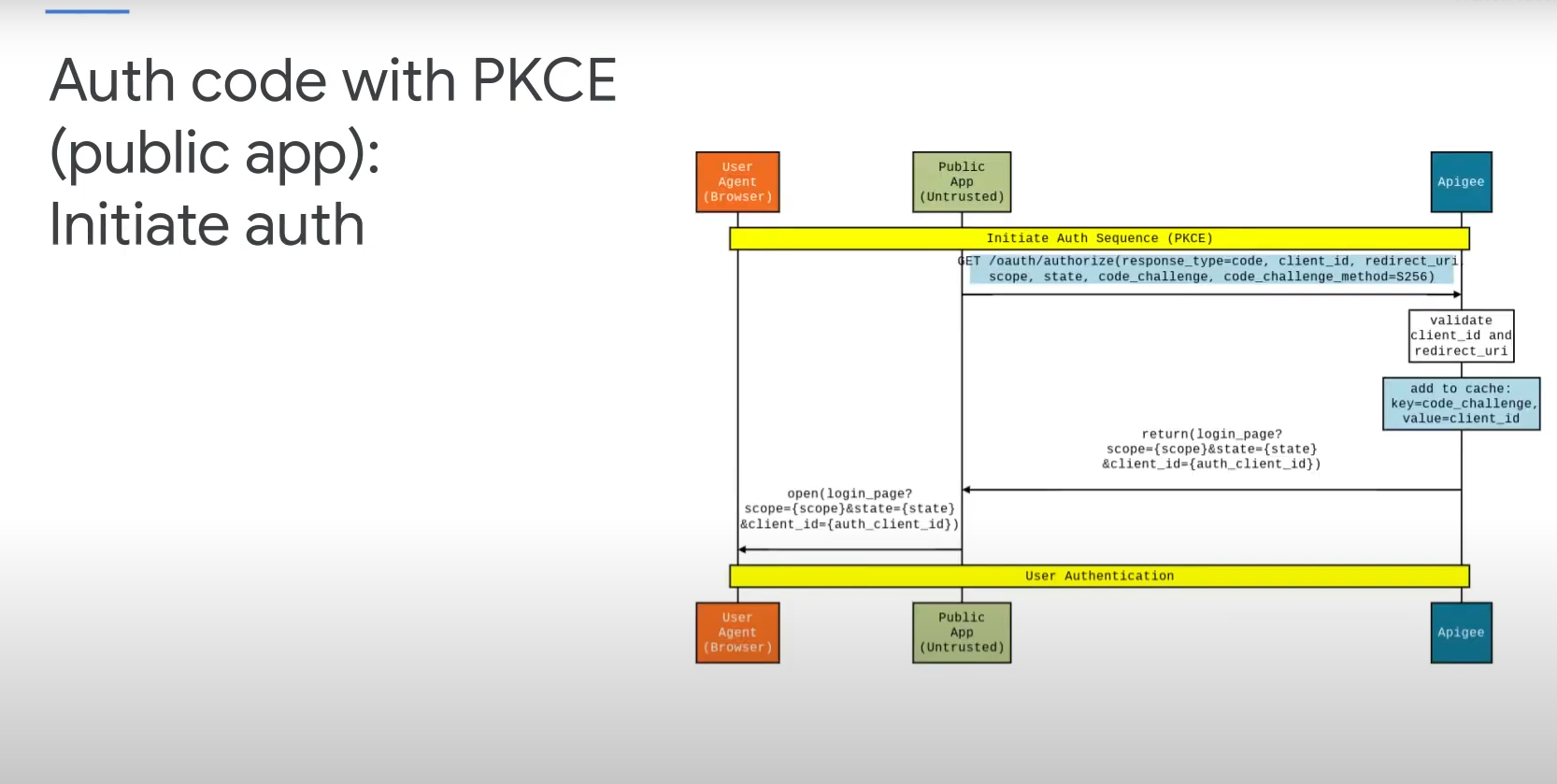
The client redirects the user to the authorization server with:
response_type=codeclient_idredirect_uriscopestatecode_challengecode_challenge_method=S256
The user logs in and consents.
The authorization server returns an authorization code to the client.
3. Token Exchange
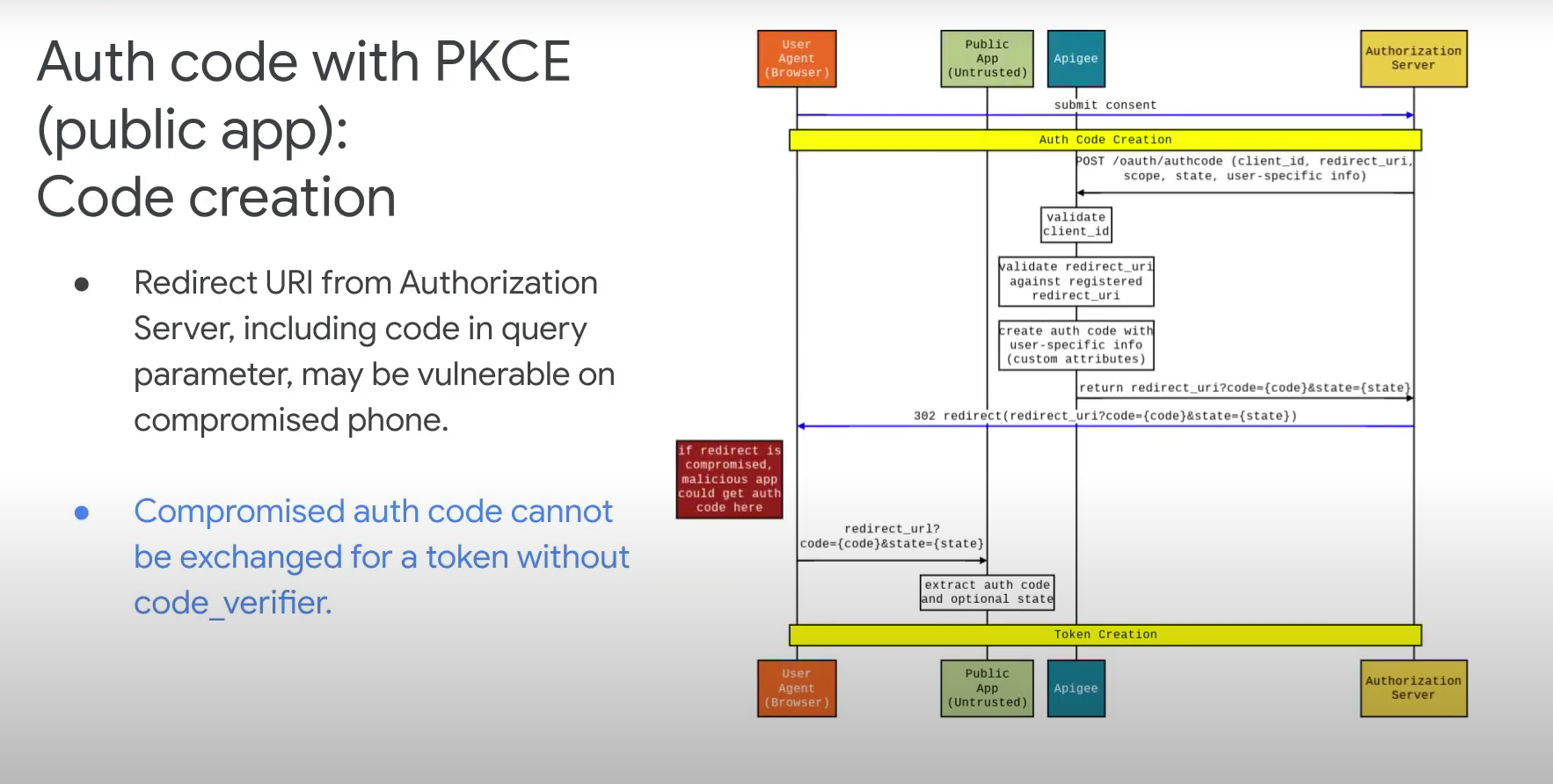
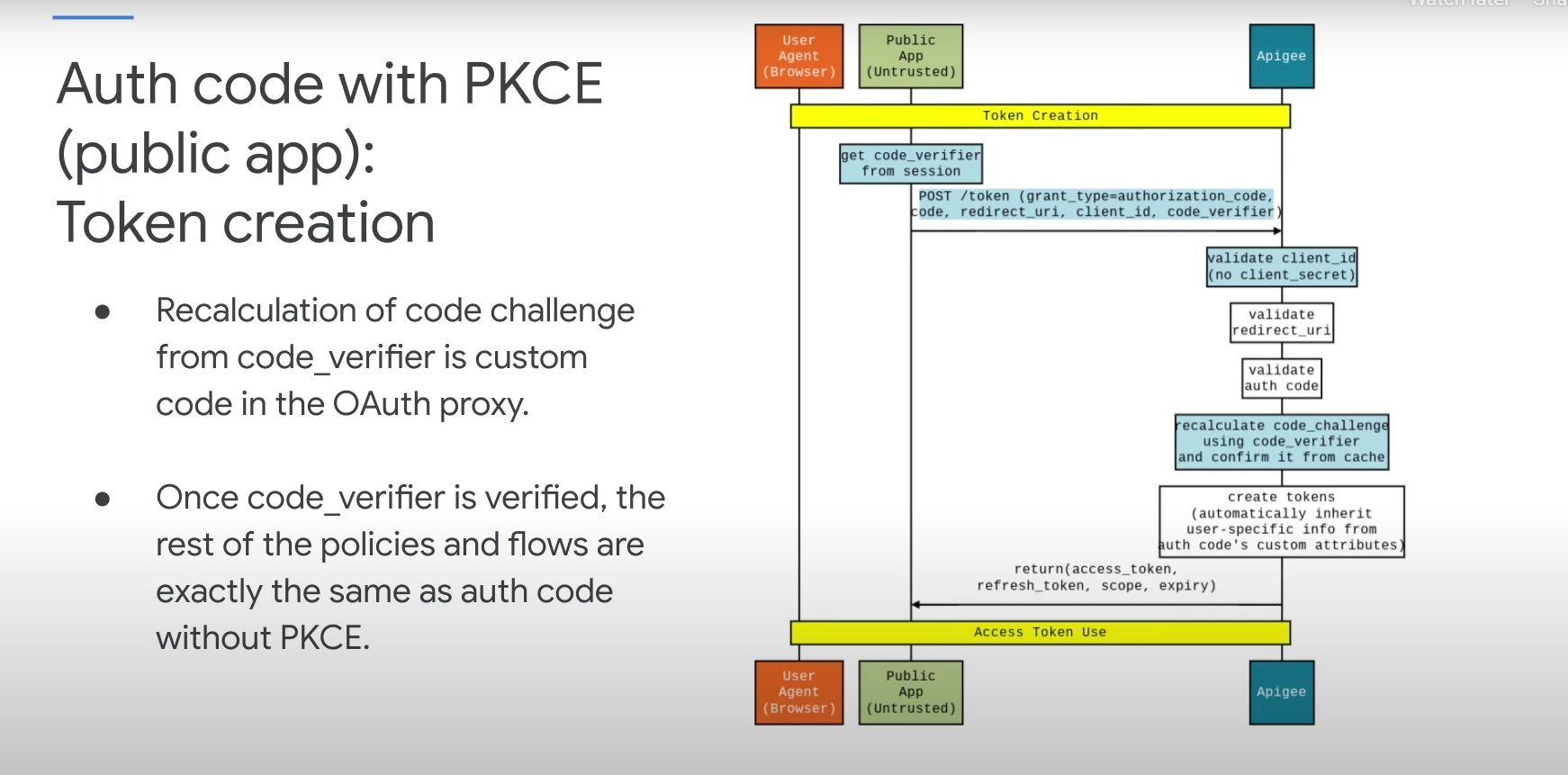
The client sends a POST request to the token endpoint with:
grant_type=authorization_codecoderedirect_uriclient_idcode_verifier
The server recalculates the code_challenge from the
code_verifierand compares it with the original.If they match, the server issues an access token.
Q: What is a Refresh Token and how does the Refresh Token flow work in OAuth 2.0?
Answer:
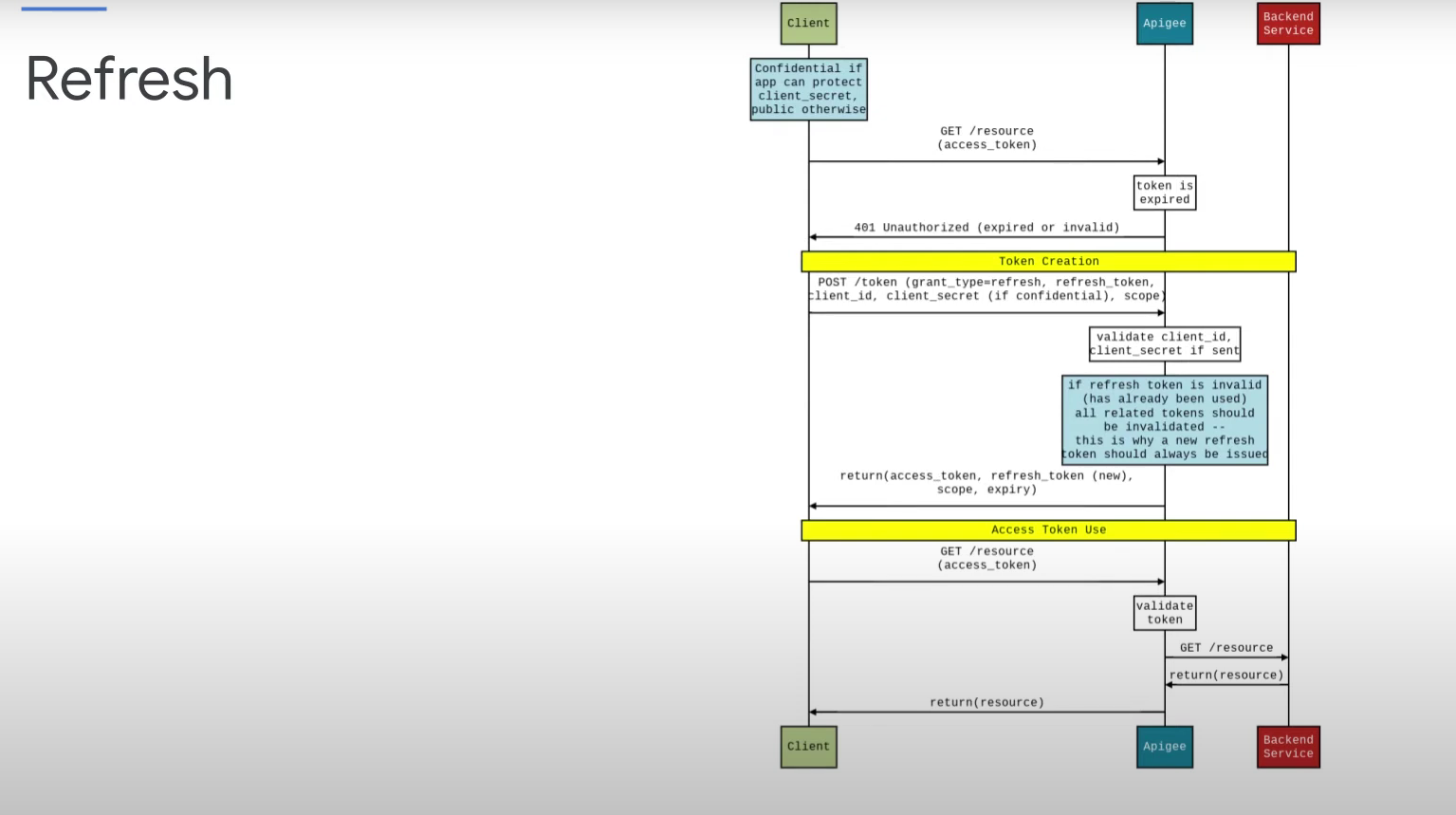
A Refresh Token is a credential used to obtain a new access token without requiring the user to re-authenticate. It helps maintain session continuity in secure applications.
🔄 Refresh Token Flow Breakdown
Client → Resource Server
- Sends a request to access a protected resource using an access token.
Resource Server → Client
- Returns 401 Unauthorized if the access token is expired or invalid.
Client → Authorization Server
Sends a POST request to the
/tokenendpoint with:grant_type=refresh_tokenclient_idclient_secretrefresh_token
Authorization Server
Validates the
client_id,client_secret, andrefresh_token.If valid, issues a new access token (and optionally a new refresh token).
If invalid or expired, returns an error.
Authorization Server → Client
Returns:
access_tokentoken_typerefresh_token(optional)expires_in
Client → Resource Server
- Retries the original request using the new access token.
Resource Server → Client
- Returns the requested resource successfully.
Q: What are Flow Hooks in Apigee and how do they work?
Answer:
Flow Hooks in Apigee allow you to attach shared flows at specific points in the API proxy execution pipeline. These hooks apply globally across all proxies in an environment, making it easy to enforce common logic like authentication, logging, or rate limiting.
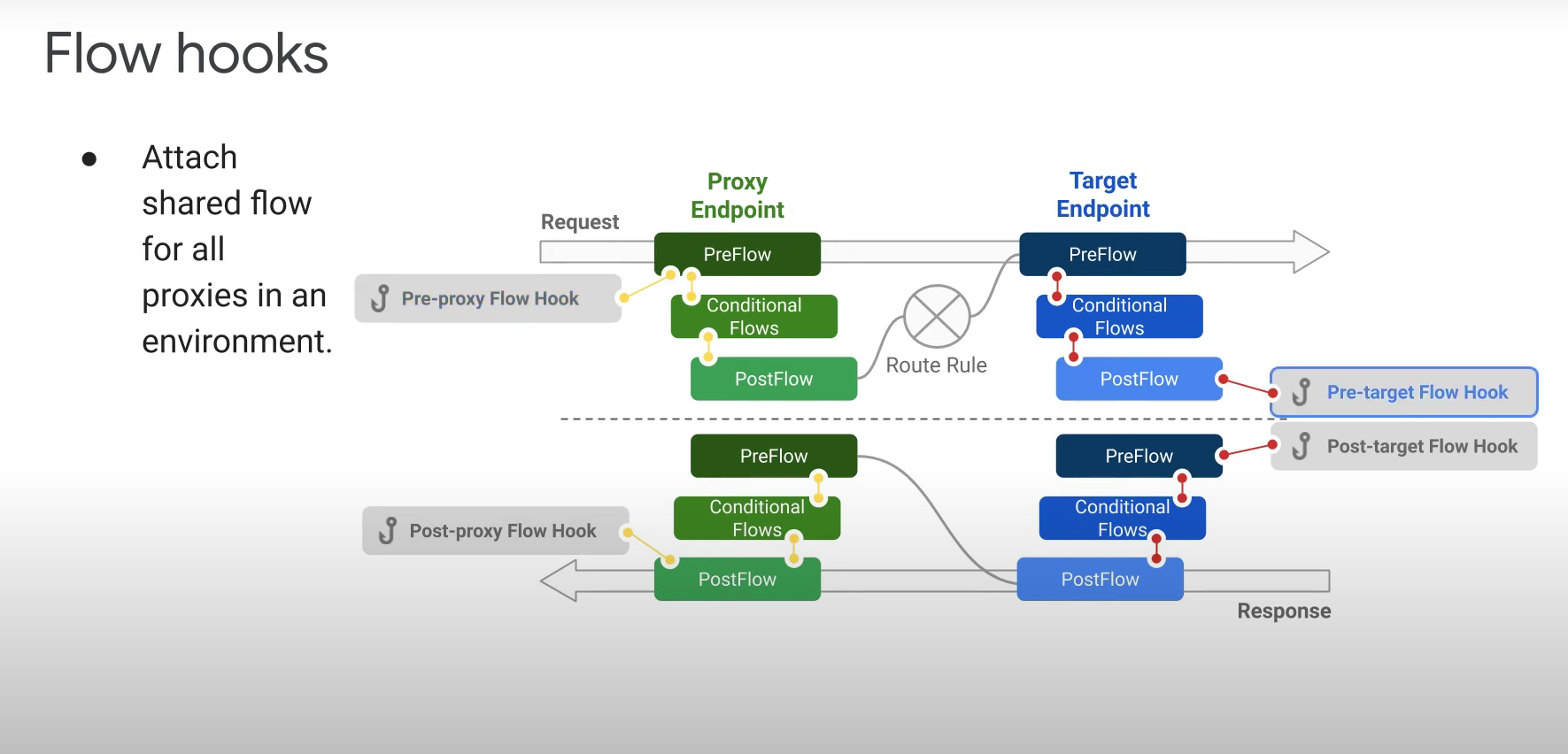
🔁 Flow Hook Execution Points
Apigee supports four types of flow hooks:
Pre-Proxy Flow Hook
Executes before the proxy endpoint receives the request.
Common use: global authentication, logging, or IP filtering.
Post-Proxy Flow Hook
Executes after the proxy endpoint sends the response.
Common use: response logging or transformation.
Pre-Target Flow Hook
Executes before the request is sent to the target backend.
Common use: header enrichment, routing logic, or additional validation.
Post-Target Flow Hook
Executes after the response is received from the target backend.
Common use: response formatting, caching, or analytics.
Flow Structure in Proxy Execution
Each proxy has two main sections:
Proxy Endpoint
- Contains
PreFlow,Conditional Flows, andPostFlowfor request handling.
- Contains
Target Endpoint
- Contains
PreFlow,Conditional Flows, andPostFlowfor response handling.
- Contains
Flow hooks wrap around these sections, allowing shared logic to run before and after both proxy and target flows.