API (Application Program Interface)

What is an API?
It is a set of defined rules that enable different applications to communicate with each other. It acts as an intermediary layer that processes data transfers between systems.
In simple terms, API means a software code that can be accessed or executed. It helps two different software's to communicate and exchange data with each other.
How does it work?
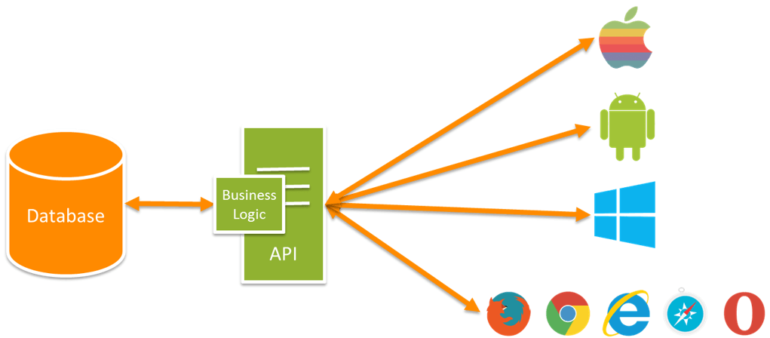
Application Program Interface
To understand what an API is and how it works.
Imagine a library with books, a librarian, and people who want to borrow to add, update, and delete books.
Client: web application, mobile app, smartwatch, an interface that accesses data.
Library: Database or Database server or Nay server where data is stored.
Librarian: API (receiving, processing, and handling request and response).
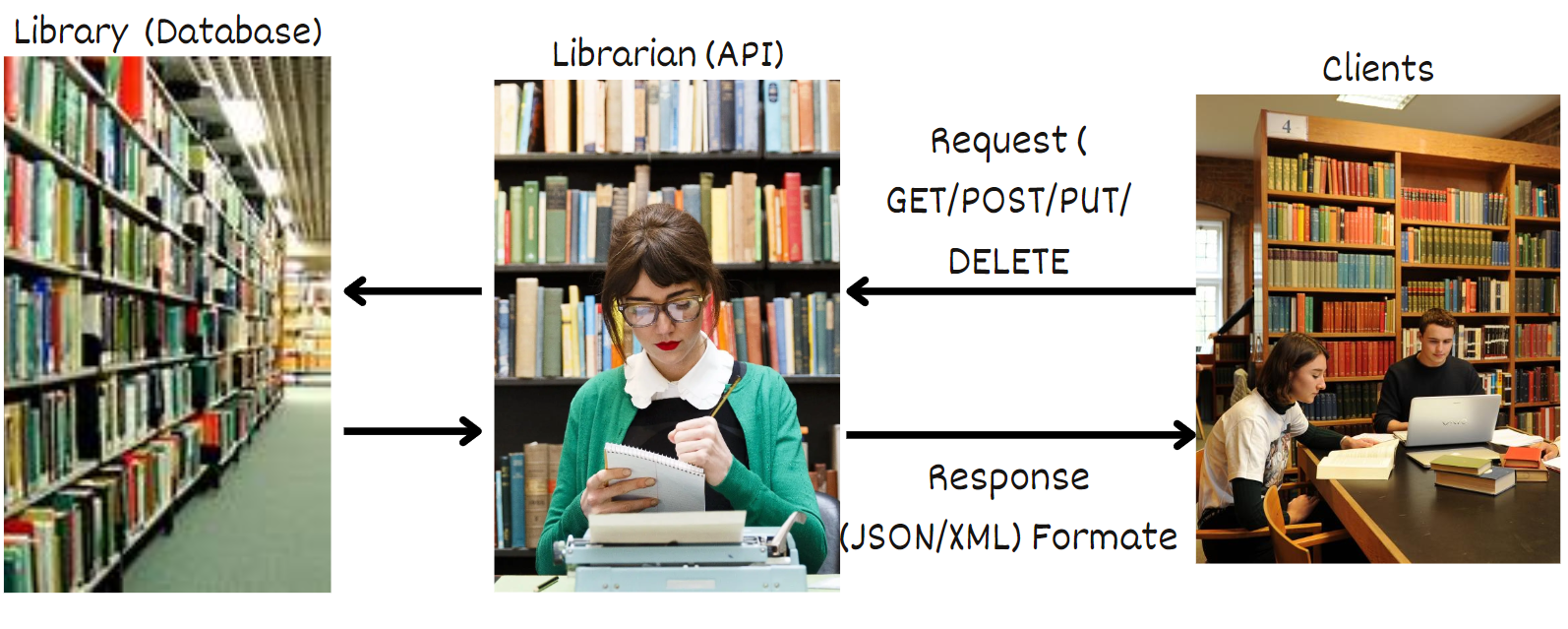
When a client submits a request to get a resource. API receives that request, identifies it, figures out what data needs to be gathered in what format, creates a representation of data, bundles it all with the response, and sends it back to the client.
A simple explanation to understand the working of API in the real world,
The client is a developer who develops some web applications, mobile applications, smartwatch applications, and so on., who needs an API to access the server where actual data is stored. By using API, client can Read, Create, and Modify the data on the server.
API is an intermediate software code that helps to do operations on the server by the developer.
API request in details
A request has two parts
1. Method: This is one of the standard HTTP operators,
GET, POST, PUT, PATCH, DELETE, OPTIONS, and HEAD
2. URI: URI points to the backend server where data is stored.
https://restful.dev/posts/5
Let's understand the request in detail with an example.
request
if we want to list most of the recent post from the site, we send a GET request to the resource URI for all posts
GET site.com/wp-json/wp/v2/postswhen we submit a request, we can also send metadata in the request
GET /wp-json/wp/v2/posts/ HTTP/1.1
Host: appsite.dev
Content-Type: applocation/json
Authorization: Basic dG9toBHvk3N33JK
cache-control: no-cache
GET the posts from site(site.com/wp-json/v2/posts), HTTP protocol is used of version 1.1
The request was originated by appsite.dev (IP of client)
The type of content needed by the client is JSON
The client sends his credentials by encoding it to ID for authorization
no-cache, when we don't want any response to be cached.
HTTP request methods/Verbs:
GET - We use this to read or retrieve a resource from the database. If it is successful it returns a response containing the information we requested.
POST - We use this to create a new resource. A post request requires a body in which we define the data to be created in the database.
PUT - We use this to modify a resource. It updates the entire resource with data that is passed in the body payload. If no resource matches the request, it will create a new resource.
PATCH - We use this to modify a part of a resource. We only need to pass the data that we want to update.
DELETE - We use this to delete a resource from the database.
HEAD - We use this to retrieve the header/meta information from the response message.
API response in details
When we send a request to an API, the API sends some form of response back to a client. This response comes with the head section and whatever the content that resource provided.
The client uses the head section to handle the returned data. content of the head section varies depending on the type of method used and what kind of resources we requested.
Let's understand the response in detail with an example.
Send request
HEAD http://restful.dev/wp/v2/postsresponse
HTTP/1.1 200 OK
Date: Wed, 08 Nov 2017 00:41:19 GMT
Server: Apache/2.4.27 (Win64) PHP/5.6.31
X-Powered-By: PHP/5.6.31
X-Robots-Tag: noindex
Link: <http://restful.dev/wp-json/>; rel="https://api.w.org/"
Allow: GET
Keep-Alive: timeout=5, max=100
connection: Keep-Alive
Content-Type: application/json; charset=UTF-8
HTTP protocol is used,
HTTP status message is 200 OK(If we hit a resource that exists),
Date and time of delivery,
Type of server that delivered the content,
The type of content in the response is in JSON format.
All of this information tells the client about the data it receiving and the environment it received from. This information helps the client to figure out how to parse the data and perform more actions.
HTTP status messages
HTTP status message is at the top of the response header and gives the client an immediate notification about the status of the request-response pair.
The client uses this response code to identify successes and failures.
HTTP response status codes are split into five main groupings.
1XX - Information
2XX - Success
3XX - Redirection
4XX - Client error
5XX - Server error
Status code of 1XX format:
They are used to inform the client of the status of the server, typically to wait for the server to finish.
Something like, I got your request and I am processing it, hold on. and so on,
Status code of 2XX format:
200 OK -- This means the request was successful.
201 Created -- This means the request was successful and a new resource was created.
204 No content -- The server processed the request but returned no content.
Status code of 3XX format:
This means the client is provided with a new URL to follow to get to the resource.
301 Moved permanently -- This tells the client to use this URL for aa future requests.
302/303 found at this other URL -- This tells the client that, this resource is temporarily redirected to this other URL.
307 Temporary redirect -- similar to 302.
308 resume incomplete -- permanent redirect status indicates that the resource requested has been definitively moved to the URL given by the Location headers.
Status code of 4XX format:
400 Bad request -- indicates the request is malformed to too large, or similar.
401 Unauthorized -- indicates that the client didn't provide proper authentication to access the resource.
403 forbidden -- indicates that the request is immediately refused by the server. Because the client is not logged in or does not have the correct permissions.
404 Not found -- indicates that the resource does not exist in the server.
405 method not allowed -- if we try to use HTTP verbs(Get, Post, ..) like a post on a resource that can only receive get requests.
Status code of 5XX format:
500 Internal server error -- indicates something went wrong on the server.
502 Bad gateway -- indicates the server acts like a gateway or proxy and receives an invalid response from the server.
503 Service unavailable -- this encounter when the server is overloaded or temporarily unavailable.
Different types of APIs
with respect to,
Programming Languages:
Java API
Servlet API
JNDI API
By using this API we can create Java, Servlet, and JNDI related programs.Web Services:
Soap API: It describes how to consume a SOAP web service.
Rest API: It describes how to consume a Restful web service.
We will focus on Web service APIs and in that, we will choose the Rest API.
Why did we choose the Rest API you came to know later in this blog?Note:
API specification file: This file describes how to consume a Soap and Rest API.As we know, the Developer(Client application) consume data by using the API (Service provider). The client sends a request, and a request is received by the API which will process it, and generate the response that contains data. Then the response will given back to the client and the client consume the data from the response.
To send the request to the API, a client should know a few details about the API, which include the Endpoint URL of the API, the number of operations exposed from the API, Schema of the data that is being exchanged between the request and response.
The service provider(API) must describe the above details and share them with the client. To describe this we need to create an API specification file.
| SOAP API | REST API |
| Uses SOAP as an application-level protocol | Uses HTTP as an application-level protocol |
| Supports only XML type of exchange | Supports any data type for data exchange |
| Complex compared to REST | Simple compared to SOAP |
| Only uses WSDL as API specification file | No official API specification file. Many unofficial files such as RAML. SWAGGER, WADL, and so on |
| SOAP protocol should be followed to define operations. | HTTP paths and verbs can be used to define operations. Ex: /employee GET |
| Should be secured using WS-Security models | Can be secured using any HTTP authentication techniques, EX: Basic Auth, OAuth, etc. |